Guide
TCL TV Remote App: Control Your TCL Roku & Google TV From Your Phone
On this page
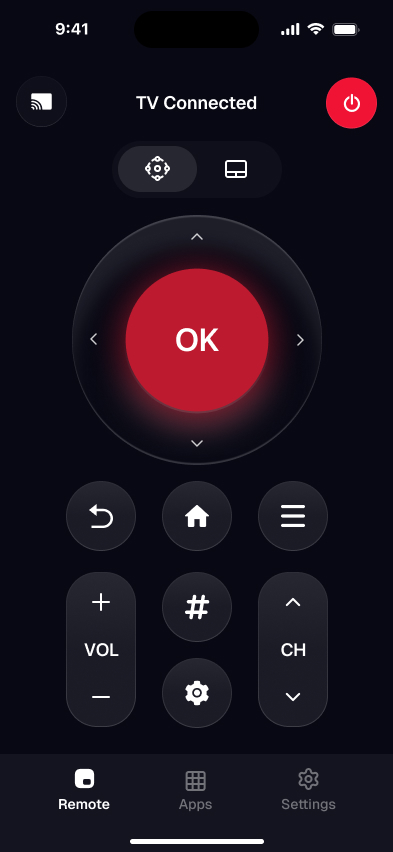
A TCL TV remote app turns your iPhone into a full remote for a TCL Roku TV or TCL Google TV. It connects over your home Wi-Fi — no infrared, no dongle — and gives you a D-pad, volume, playback, and a real keyboard for typing searches. Download one free and it finds your TV on its own, so you stop hunting for the plastic remote.
There are three practical ways to do this, depending on which TCL you own and whether you want one app for every TV in the house. Here they are, with the exact steps and the honest catches for each. If you just want the linear walkthrough, jump to how to connect your phone to a TCL TV as a remote . Prefer a side-by-side of the routes? See the four ways to control a TCL TV with your phone . Lost the clicker for good? Compare every remote for a TCL TV — including physical replacements. The iPhone-specific guide used to live at its own address and is now part of this page. Want the buttons mapped out first? See the button-by-button map of what a phone remote replaces. Wondering if there's an official TCL remote app (and what T-Cast actually does)? We answer that separately. Just want to be sure it's free? See which TCL TV remote apps are truly free. In a hurry? Let our TCL remote finder tool match your TV to the exact app in a few taps.
Method 1: Use a universal remote app for any TCL TV
A universal app such as Smart TV Remote pairs with both TCL Roku TVs and TCL Google TV models — and other Wi-Fi TVs — from a single app, so you don't care which platform a given set runs. This is the simplest route if your household mixes TCL models or brands.
- 1Download the app. Install Smart TV Remote free from the App Store on your iPhone or iPad (iOS 16.0 or later).
- 2Join the same Wi-Fi as the TV. Connect your iPhone to the exact same home Wi-Fi network your TCL TV is on. That shared network is how the phone reaches the TV.
- 3Pick your TCL TV. Open the app and it scans the network. Tap your TCL TV in the detected list to connect — no pairing code needed.
- 4Start controlling. Use the on-screen D-pad, OK, volume, playback, and keyboard exactly like the plastic remote. The TV reconnects automatically next time.
Catch: because it works over the network, the TV has to be on and joined to the same Wi-Fi. A TV that's fully unplugged can't be woken from a phone. Once the D-pad works, the same taps open TV menus — including Roku TV screensaver settings and the best Roku TV picture settings.
Method 2: Use the official Roku app for a TCL Roku TV
If your TCL runs Roku OS, Roku's own mobile app is a solid single-TV option with a nice extra: private listening, which pipes the TV audio to your headphones through the phone.
- 1Install the Roku app from the App Store and sign in with a free Roku account.
- 2Put your iPhone on the same Wi-Fi network as the TCL Roku TV.
- 3Open the Devices tab — the app lists your TCL Roku TV; tap to connect.
- 4Use the on-screen remote, keyboard, and private-listening button.
Catch: it only pairs with Roku-powered TVs and needs a Roku account. It won't touch a TCL Google TV model. Home on that on-screen remote opens Settings the same way as the plastic clicker — see how to get to Settings on a Roku TV. Full pairing details and fixes are in our TCL Roku TV remote app guide.
Smart TV Remote
Juggling the Roku app and the Google TV app for different TCLs?
Smart TV Remote pairs with both from one screen — free, no account.
Smart TV Remote
Free · iOS 16+


Method 3: Use the Google TV app for a TCL Google TV
TCL sets that run Google TV or Android TV can be driven by Google's own app, which includes a built-in remote with a D-pad, voice search, and a keyboard. It also lets you cast to Chromecast-built-in TCL TVs.
- 1Install the Google TV app (formerly Google Home / Android TV Remote) and sign in with your Google account.
- 2Connect your iPhone to the same Wi-Fi as the TCL Google TV.
- 3Open the app, tap the remote icon, and select your TCL TV.
- 4Confirm the pairing code shown on the TV, then control it from the phone.
Catch: it only works with Google/Android TV models, and the first connection asks for a one-time pairing code shown on the TV screen. Full setup and troubleshooting are in our TCL Google TV remote app guide. For an older set on the pre-Google-TV platform, the dedicated TCL Android TV remote app guide covers the retired Android TV Remote Control app and its replacement.
Which TCL remote app should you use?
All three control a TCL over Wi-Fi. The difference is how many TVs each one covers and what extras you get.
| Feature | Universal app | Roku app | Google TV app |
|---|---|---|---|
| Works with | TCL Roku + Google TV | TCL Roku TV only | TCL Google TV only |
| Needs Wi-Fi | Yes | Yes | Yes |
| One app for mixed TVs | Yes | No | No |
| Keyboard search | Yes | Yes | Yes |
| Account sign-in | No | Roku account | Google account |
| Price | Free | Free | Free |
Smart TV Remote
Want the one app that covers every TCL in the house?
Smart TV Remote finds your TV on Wi-Fi and connects in a tap.
Smart TV Remote
Free · iOS 16+
What a phone remote replaces, button by button
A phone remote app does more than the plastic clicker, not less. Here's every control on a standard TCL remote and how each app type handles it — so you know exactly what you gain and the one or two things that don't carry over.
| Control | Official platform app | Universal app |
|---|---|---|
| Power on/off | Yes | Yes |
| Volume & mute | Yes | Yes |
| D-pad & OK | Yes | Yes |
| Back & Home | Yes | Yes |
| Keyboard search | Yes | Yes |
| Playback (play/pause) | Yes | Yes |
| Private listening | Roku app only | Varies |
| Account sign-in | Yes | None |
The app also adds what the clicker can't — a real keyboard for typing searches, and, in the Roku app, private listening through your headphones. Only device-specific infrared buttons don't carry over.
If you're looking for a free TCL remote app
Several apps advertise a free TCL remote and then paywall the D-pad. The official Roku app, the Google TV app, and a no-account universal app like Smart TV Remote are genuinely free for power, volume, and search. If an app asks you to subscribe before the remote appears, that's the paywall — skip it. Lost the clicker? The same free app is the replacement: join the TV's Wi-Fi, tap the set, and you have a full remote.
If there's no official TCL remote app
There isn't one TCL-branded remote app for every set. TCL Roku TVs use Roku's app. TCL Google TV and older Android TV sets use Google's app (T-Cast only handles casting on some Google TV models, not a full D-pad). A universal app covers both platforms from one phone, which is why it's the Method 1 default above.
If you want to connect your phone as a remote
Put the phone on the same Wi-Fi name as the TCL, open the app, and tap the TV when it appears. Roku and Google TV apps may show a pairing code on screen; a universal app usually connects without one. iPhones have no IR blaster, so guest Wi-Fi, VPNs, and a fully-off TV (network radio asleep) are the usual reasons a scan comes up empty. If audio keeps playing while the picture dies, triage that fault first in TCL TV screen goes black but sound still works.
FAQ
Does the TCL TV remote app work without the original remote?
Yes. As long as your TCL TV is powered on and connected to Wi-Fi, the app controls it end to end — power off, volume, navigation, and playback. The one thing it can't do is turn on a TV that's fully unplugged, since there's no network to reach at that point.
Do I need Wi-Fi to use the app?
Yes. iPhones have no infrared blaster, so the app talks to your TCL TV over your home network instead of an IR beam. Your phone and the TV must be on the same Wi-Fi. If either one is on guest Wi-Fi or cellular data, the app won't find the TV.
Will one app control both my TCL Roku TV and TCL Google TV?
A universal app like Smart TV Remote is built to handle both, plus other Wi-Fi TVs, from one place. TCL's own apps are split by platform: the Roku app only pairs with Roku TVs and the Google TV app only pairs with Google TV models, so you'd juggle two apps otherwise.
Can I use my iPhone as a TCL remote over Bluetooth or IR?
No. There's no infrared hardware in an iPhone, and TCL TVs don't pair as Bluetooth remotes with a phone. Every phone-based TCL remote — the official apps and third-party ones alike — works over Wi-Fi. That's why both devices need to share the same network.
Is the TCL TV remote app free?
Smart TV Remote is a free download. TCL's official Roku and Google TV apps are free too. Check any third-party app's App Store listing for optional in-app purchases before installing, so you know exactly what's free and what isn't.
Why can't the app find my TCL TV?
Almost always it's a network mismatch or a phone permission. Confirm the phone and TV are on the same Wi-Fi band and network name, turn off any VPN on the phone, allow the app's Local Network prompt in iOS Settings, and make sure network or DIAL control is enabled in the TV's settings. Restarting the TV and reopening the app usually clears a stuck scan.