Your TCL TV remote
in your pocket.
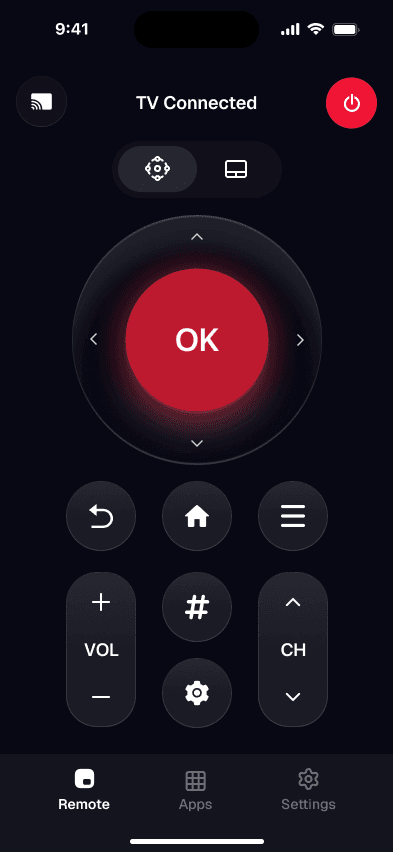
Lost the clicker again? Your iPhone becomes the remote for your TCL — Roku TV, Google TV, Android TV or Fire TV, whichever one it runs — over the Wi-Fi you already have. Full controls, and a real keyboard for searching.
Works over Wi-Fi · No account · No extra hardware
Free
to download
No account
no sign-up
No ads
on the remote
- TCL
- Roku TV
- Google TV
- Fire TV
How it works
Set up in about a minute
No pairing codes to type in, no dongle to plug in. It works over the Wi-Fi you already have.
- 1
Join the same Wi-Fi
Put your iPhone and your smart TV on the same home network. That shared connection is what lets the app reach your TV.
- 2
Open the app — it finds the TV
Smart TV Remote scans your network and lists any compatible TVs it sees. Tap yours to connect. Setup takes a few seconds.
- 3
Point, tap, done
Use the on-screen pad, volume, and keyboard exactly like the physical remote — the TV responds in real time.
Straight talk on compatibility: Smart TV Remote controls network-connected smart TVs that share your Wi-Fi — TCL, Roku TV, Google/Android TV, Fire TV and similar. It does not replace an infrared remote for older TVs with no network, and iPhones have no IR blaster, so a TV that isn't on Wi-Fi can't be reached. If your TV connects to the internet, you're good.
App vs. the plastic remote
Why reach for your phone instead
| Feature | Smart TV Remote | Plastic remote |
|---|---|---|
| Always on you — never lost in the cushions | ||
| Type to search with a full keyboard | ||
| Controls several TV brands from one screen | ||
| No line-of-sight aiming (works over Wi-Fi) | ||
| Never needs new batteries | ||
| App launcher shortcuts for streaming |
Everything the plastic remote does
A better remote you never lose down the couch
One app, every TCL
TCL ships four different systems — Roku TV, Google TV, Android TV and Fire TV. One app drives all of them over Wi-Fi, so it keeps working when you change the TV.
Full control, at a thumb
Power, volume, channels, a directional pad, and playback — every button of the original remote, laid out for one-handed use.
Type instead of peck
Search shows, apps, and logins with your iPhone keyboard. No more spelling out titles one arrow-key at a time.
Finds your TV instantly
Open the app and it discovers TVs on your Wi-Fi automatically. No pairing dongles, no IR blaster, no cables.
Jump straight into apps
Launch Netflix, YouTube, Disney+ and more from the remote instead of scrolling the TV's cluttered home row.
Made for the couch
A calm, high-contrast layout with large tap targets — easy to read and hit at arm's length in a dim room.
Pricing
Free to start. Pro when you want more.
Downloading and using the core remote is free. Pro prices come straight from the App Store listing and start from the figures shown — Apple charges in your local currency, so the exact amount depends on your country and on the offer you are shown.
Free
$0forever
- Core remote (D-pad, volume, power)
- Automatic TV discovery
- One paired TV at a time
Pro — Weekly
from $4.99/ week
- Everything in Free
- Keyboard search & app shortcuts
- Unlimited paired TVs
- No ads
Pro — Yearly
from $9.99/ year
- Everything in Pro Weekly
- Best price per month
- Cancel anytime
FAQ
Questions, answered
Does Smart TV Remote work with my TCL TV?
Yes, as long as your TCL TV is connected to your home Wi-Fi. Smart TV Remote controls network-connected TCL TVs (including Roku TV and Google TV models) over that shared Wi-Fi — the same network your iPhone is on.
Do I need Wi-Fi, or does it use infrared like the plastic remote?
It works over Wi-Fi, not infrared. iPhones don't have an IR blaster, so Smart TV Remote reaches your TV through your home network instead. Your phone and TV just need to be on the same Wi-Fi.
Which TV brands are supported?
Wi-Fi smart TVs including TCL, Roku TV, Google TV, Android TV, and Fire TV. If your TV connects to the internet and supports network control, the app can usually find and control it.
Is Smart TV Remote free?
The app is free to download and includes the core remote controls. An optional Pro subscription unlocks extras like keyboard search, app shortcuts, and unlimited paired TVs.
Why can't the app find my TV?
Almost always it's a network mismatch — the phone and TV are on different Wi-Fi bands or networks (for example a 2.4 GHz vs 5 GHz band, or a guest network). Put both devices on the same network and re-scan.
Does it run on iPad, and is it affiliated with TCL or Roku?
It runs on iPhone and iPad with iOS 16 or later. Smart TV Remote is an independent third-party app and is not affiliated with, endorsed by, or sponsored by TCL, Roku, or any TV manufacturer.
Setting it up? Read the full TCL Roku remote app for iPhone guide.
Get it on your iPhone
Point your camera — start controlling
Scan the code with your iPhone camera to open Smart TV Remote on the App Store, or tap the button below.
iOS 16.0+ · iPhone & iPad