Interactive tool
TCL TV Black Screen Diagnostic
Black screen but the sound still plays, or a light is on? “Black screen” is really four different faults. Answer what you see and the diagnostic runs the checks in the right order — the flashlight test, a power-cycle, the outlet, and the HDMI handshake — to name the exact cause and tell you if it's a home fix or a warranty case.
What is your TCL TV doing right now?
Pick the line that matches what you actually see and hear. A black screen has four different causes, and the only way to tell them apart is the order you check them in — so the next step depends on your answer, not a guess.
The diagnostic runs entirely in your browser — nothing is sent to us or to your TV. It reads the symptoms you report; it can't open the set or read internal sensors, so a repair or warranty verdict is guidance to confirm with TCL support, not a bench diagnosis.
Smart TV Remote
Fixed a freeze or an input, or waiting on a repair? Once the picture is back,
Smart TV Remote runs your TCL from your phone over Wi-Fi — inputs, settings, and volume — so a flaky or missing remote never adds to the trouble.
Smart TV Remote
Free · iOS 16+


Why a black screen isn't one problem
The reason a black screen is so hard to search for is that the same symptom hides at least four unrelated faults — a burnt-out LED backlight, a failed panel or board, a power-supply that won't start the set, and an HDMI handshake that has nothing wrong with the TV at all. From the sofa they look identical.
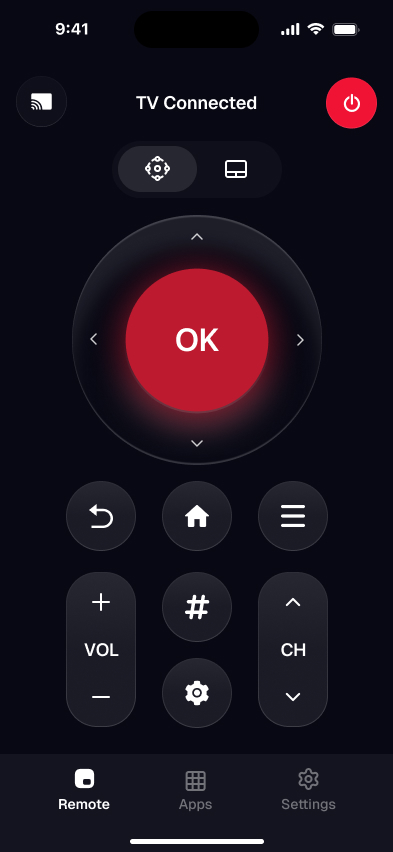
What separates them isn't more reading — it's the order you run a few physical checks in, where each answer decides the next step. That's what the tool does and a printed list can't: the flashlight test alone splits a dead backlight from a dead panel, and “black on every input, including the TV's own menu” quietly reroutes an HDMI question back to that same test. The illustration shows where the app fits — once the picture is back, your phone is the remote that drives it.
If the TV is fine and it's the clicker that died, run the remote-vs-TV troubleshooter instead. Got a Roku model? Fix a TCL Roku TV remote. And to control the set from your phone the moment it displays again, the TCL remote finder points you to the right method.
TCL TV black screen — FAQ
Why is my TCL TV screen black but the sound still works?
Sound with no picture almost always means the display side has failed while the rest of the TV runs. The fastest way to tell which part is the flashlight test: shine a bright light on the screen at a steep angle in a dark room. If you can see a faint image, the panel is drawing the picture and the LED backlight has failed. If there's nothing even under the light, it's more likely the panel, the T-CON board, or the main board. The diagnostic above walks you through it.
How do I fix a TCL Roku TV black screen?
Start with a real power-cycle: unplug the TV for 60 seconds, hold its own power button for 30 seconds while unplugged, then plug it back in — this clears the software freeze behind most TCL Roku TV black screens. If it stays black, cycle the inputs and reseat the HDMI cable, since a source-device handshake is a common cause. Only after those do you test for a backlight or board fault. The tool above routes you through that order for a Roku TV specifically.
What is the flashlight test for a black TV screen?
It's a quick way to separate a dead backlight from a dead picture. With the TV on in a dim room, shine a bright flashlight — a phone torch works — onto the screen at a steep, almost-sideways angle and look closely for a faint, ghostly image. Seeing one means the panel still works and only the backlight LEDs have failed. Seeing nothing points at the panel or the boards that drive it. It costs nothing and decides which repair you're facing.
Is a TCL TV black screen covered by warranty?
It depends which fault it is. A failed backlight, a bad panel or T-CON board, and a power-supply failure are internal hardware faults — if the TV is inside its warranty window, they're normally covered, so open a claim with TCL support before paying anyone. A software freeze, a bad HDMI cable, or the wrong input aren't hardware failures and cost nothing to fix yourself. The diagnostic labels each result as a home fix or a repair/warranty case.
Can I fix a TCL black screen myself?
Some causes, yes. A frozen TV clears with a power-cycle, an input or HDMI-handshake problem is solved by cycling inputs and reseating the cable, and a dead outlet or surge protector is an easy swap — all free and at home. A failed backlight, a cracked or dead panel, or a power-board fault means opening the set, which is a technician's job and often a warranty claim instead. The tool tells you which of the two you're dealing with before you spend anything.
Smart TV Remote
Sorting a black screen means a trip through inputs and settings.
Smart TV Remote drives your TCL over Wi-Fi — switch inputs and open menus from your phone, free, no account, no infrared.
Smart TV Remote
Free · iOS 16+