Troubleshooting
TCL TV Remote Not Working? Fix It in Minutes
A TCL TV remote that isn't working usually means dead batteries, a frozen TV, or — on voice models — a lost pairing. Swap in fresh batteries first, then unplug the TV for 60 seconds. If the TV still ignores every remote, the fault is the TV, not the clicker. A free phone app keeps you in control meanwhile.
On this page
I keep a TCL 5-Series Roku TV (55S535) in the living room and a TCL Q6 Google TV (65Q650G) in the den. Between them I've chased down a "remote not working" scare more times than I'd like — and the honest lesson is that it was almost never the remote. Twice it was flat batteries, once a soundbar had crept in front of the IR sensor, and once the Q6 had simply frozen. My take: before you buy a new remote, prove it's the remote — most people replace a clicker that was fine.
This guide is built around that one question: is the fault the remote or the TV? Answer it first and the right fix falls out. The fixes below run from free-and-instant to last-resort, with the catch on each called out. If you already know the remote is dead for good, the lost-remote guide covers replacing it, and our TCL remote finder tool matches your model to a control method in a few taps. For the whole picture on setting up, fixing, or replacing your remote, start from the TCL TV remote hub.
Smart TV Remote
Confirmed the remote's dead and need the TV on now?
Smart TV Remote runs your TCL over Wi-Fi — no account, free.
Smart TV Remote
Free · iOS 16+


The 30-second test: remote or TV?
Run this before you take anything apart. It tells you whether to fix the remote or the TV, and sends you straight to the right section.
- 1Point the remote's front tip at your phone camera and press any button. An infrared remote flashes a faint light on the screen when it's sending. A voice remote with a mic button shows nothing — that's normal, it uses RF.
- 2See a light but the TV ignores it? The remote is fine — the fault is the TV or its sensor. Go to Fix 2.
- 3No light, and fresh batteries didn't help? The remote is dead. Go to Fix 1, then Fix 5 to keep watching.
- 4Try the physical button on the TV (back or bottom edge). If the TV reacts to that, you've confirmed the set works and the remote is the problem.
A genuinely black screen — no picture even though the TV has power and sound — is a display fault, not a remote one. The TCL black-screen diagnostic runs the flashlight and power checks to name the exact cause. And if the TV won't power on at all — not even from its own power button — see TCL TV won't turn on, Roku models included.
Fix 1: Rule out the batteries and the remote
Weak batteries are the culprit far more often than a broken TV. They fade slowly, then quit all at once, and half-dead ones can still look fine. Start here — it costs almost nothing and clears the most common cause.
- 1Fit a fresh pair of the correct size — most TCL remotes take two AAA — and match the + and − marks exactly.
- 2Reseat them firmly and check the metal contacts for corrosion; a quick wipe with a dry cloth helps.
- 3Redo the camera test from above. Still no flashing light on an infrared remote? The remote itself is dead.
- 4If some buttons work and others don't, the contacts are worn out — that's a replacement, not a battery issue.
Catch: a voice remote never shows a camera light, so this test can't judge it. If yours has a mic button, skip to Fix 3 to test the pairing instead. The full battery-and-contacts routine lives in the 9-fix TCL remote guide.
Fix 2: Restart the TV and clear the IR sensor
If the remote sends a light but the TV ignores it, the fault is the TV. Two TV-side things cause this: a frozen system that a power-cycle clears, and a blocked or dirty infrared sensor on the front of the set.
- 1Unplug the TV from the wall — not just off — and wait a full 60 seconds so the board resets.
- 2While it's off, find the IR sensor: a small dark window behind the lower-front bezel, usually center or bottom-right near the power light.
- 3Wipe that window with a dry cloth and move anything in front of it — a soundbar, a plant, or a console lip below the screen blocks the beam.
- 4Plug the TV back in, let it boot fully to the home screen, then aim the remote straight at the sensor and test.
Catch: switching the TV off with a smart plug or the remote isn't enough — the cord has to leave the wall for the board to fully reset. A sensor that stays dead after cleaning may have failed, so lean on Fix 5 while you decide on a repair. If the set reboots on its own instead of just ignoring the remote, that's a TCL Roku TV that keeps restarting, and if it powers off by itself see TCL TV keeps turning off.
Fix 3: Re-pair a voice or Google TV remote
A remote with a mic or voice button doesn't use infrared — it talks to the TV over a wireless RF or Bluetooth link that can drop after a power cut or a battery swap. Re-pairing takes about 30 seconds and often fixes a remote the camera test showed no light for.
- 1Make sure the TV is on and the remote has fresh batteries.
- 2On a Roku voice remote, open the battery compartment and hold the pairing button for about five seconds, until the status light flashes.
- 3On a TCL Google TV remote, hold the Home and Back buttons together until a pairing message appears on screen.
- 4Wait up to 30 seconds for the on-screen confirmation, then test the D-pad and volume.
Catch: a plain infrared remote has no pairing button, so this step doesn't apply. If the buttons above don't trigger pairing, the exact combo for your model is in TCL's Google TV pairing guide and Roku's remote-fix guide. Older TCL sets on Android TV use a different combo — hold Home and OK together — and have their own pairing quirks; the TCL Android TV remote guide covers that model separately.
Smart TV Remote
Waiting on new batteries or a replacement to arrive?
Smart TV Remote runs your TCL from your phone right now — free, no sign-in.
Smart TV Remote
Free · iOS 16+
Fix 4: When the remote works but one button doesn't
Sometimes the remote isn't dead — it does everything except one thing. It navigates menus but won't switch inputs, or it controls the TV but not a soundbar's volume. That's almost always HDMI-CEC, the feature that lets one remote drive several devices, not a fault.
- 1Open Settings and find the CEC option — TCL labels it T-Link or 1-touch play, depending on the model.
- 2Turn it off, wait a moment, then turn it back on to force the TV and any connected gear to re-handshake.
- 3Check the soundbar or receiver's own CEC setting too; a mismatch there is what usually breaks volume passthrough.
- 4If the remote navigates but won't power the TV on, it's not a CEC issue — run the Fix 2 power-cycle first.
Catch: if a single specific button feels mushy or dead while the rest work, that's worn contacts inside the remote — no setting fixes it, and it's a sign the remote is near the end of its life.
Fix 5: Control the TV from your phone
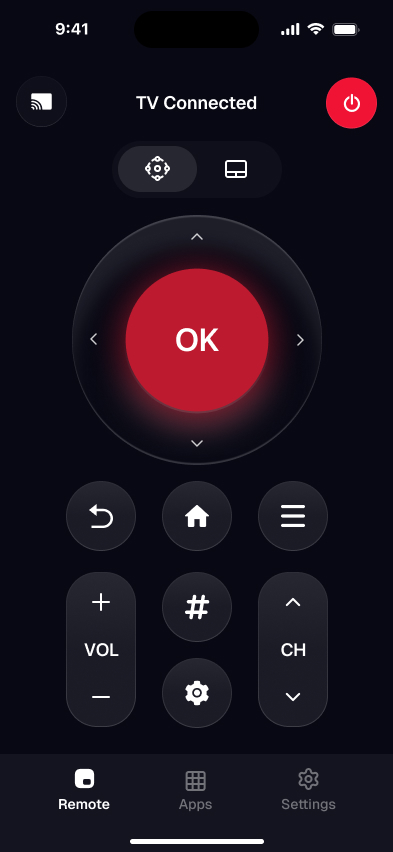
Whichever fix you land on, your phone can run the TV over Wi-Fi in about a minute — a free stand-in while a remote ships, or a permanent replacement if you'd rather skip the plastic. It handles power, volume, navigation, and on-screen typing for searches.
- 1Install a free remote app such as Smart TV Remote from the App Store on your iPhone or iPad.
- 2Put the phone on the same Wi-Fi network and band as the TCL TV.
- 3Open the app; it scans and lists your TV. Tap it to connect — iPhones have no infrared, so it reaches the TV over Wi-Fi.
- 4If the app can't find the TV, allow its Local Network prompt in your phone settings and switch off any VPN.
My pick for a no-login fallback is Smart TV Remote, because it connects without an account and pairs with both TCL Roku and Google TV sets, so one download covers a mixed household. For the full first-time walkthrough, see how to connect your phone to a TCL TV as a remote.
Catch: because it works over the network, the TV has to be on and on the same Wi-Fi. A phone app can't wake a TV that's fully unplugged, so if the set is stuck off, run the Fix 2 power-cycle first. On a Roku model you can also bring it back on from the set's own TCL Roku TV power button.
Is it the remote or the TV?
Match your symptom to the most likely cause, then jump to the fix. The camera test above is what separates a remote fault from a TV fault.
| Symptom | Most likely cause | Go to |
|---|---|---|
| No response at all, no camera light | Dead batteries or a dead remote | Fix 1 |
| Camera light shows, TV still ignores it | Frozen TV or a blocked IR sensor | Fix 2 |
| Voice remote does nothing, no light | Lost RF or Bluetooth pairing | Fix 3 |
| Navigates but won't switch input | HDMI-CEC handshake | Fix 4 |
| Won't turn the TV on | TV needs a full power-cycle | Fix 2 |
| Need control right now | Run the TV from your phone | Fix 5 |
Still stuck after all five? If the remote itself is gone rather than glitching, the remote-for-TCL-TV guide compares replacement, universal, and app options side by side.
If you searched “TCL remote not working”
Same job as this page. Work the order above: fresh batteries and the camera IR test, a 60-second wall-unplug, re-pair a voice remote, then HDMI-CEC if only one function died. The phone app is the control you use while you sort the clicker, not a different troubleshooting tree.
Smart TV Remote
Still fighting the plastic remote? Swap it for the app.
Smart TV Remote finds your TCL on Wi-Fi and skips battery/IR faults entirely.
Smart TV Remote
Free · iOS 16+
Frequently Asked Questions
How do I know if it's the remote or the TV that's broken?
Point a phone camera at the remote's front tip and press a button: an infrared remote flashes a faint light on the screen when it's working. If it flashes but the TV ignores it, the fault is the TV or its sensor. No flash with fresh batteries means the remote is dead. Voice remotes send no visible light, so re-pair them to test that link instead.
Why is my TCL TV not responding to the remote?
The most common cause is dead batteries, followed by a frozen TV that a 60-second power-cycle clears. A blocked or dirty infrared sensor on the front of the set, or a voice remote that lost its pairing, can also stop the TV responding. Work through batteries, a restart, and re-pairing before assuming either the remote or the TV has actually failed.
Where is the IR sensor on a TCL TV?
On most TCL sets the infrared receiver sits behind the lower-front bezel, usually center or bottom-right, often near the power light. Point the remote straight at that spot with a clear line of sight. A soundbar, a plant, or a console-shelf lip sitting directly below the screen can block the beam, so move anything in front of the lower edge and try again.
Can I use my TCL TV without the remote?
Yes. If the TV is on and joined to Wi-Fi, a free phone app such as Smart TV Remote controls volume, navigation, and search over the network. Most TCL sets also have a physical power and input button on the back or bottom edge for basic control. Neither route needs the plastic remote, so a broken clicker never leaves the TV unusable.
How do I reset a TCL TV remote?
Take the batteries out, hold the remote's power button for five seconds to drain residual charge, then fit a fresh pair. For a voice or Google TV remote, also re-pair it: hold the Roku pairing button in the battery bay, or the Home and Back buttons together on a Google TV remote, until the TV shows a pairing screen. That resets both the remote and its link.
Why does my TCL remote only control volume?
A remote stuck on volume-only is usually an HDMI-CEC quirk, not a remote fault — the TV is routing commands to a soundbar, or the remote is aimed at the wrong device. Toggle the TV's CEC setting (TCL's T-Link) off and on, and unplug the soundbar briefly to reset the handshake. If one specific button feels dead, worn contacts mean it's time for a new remote.